Trigger rotations with webhooks
An incoming webhook is a unique URL plus a secret key that lets external systems (CI pipelines, schedulers, incident tooling) trigger actions on a rotation without going through Slack.
Find your webhook URL and key
Section titled “Find your webhook URL and key”- Open the dashboard at app.roundrobinbot.eu and go to your rotation’s details page.
- Click Settings, open Integrations, and choose Webhooks.
- Copy the Rotation Webhook URL and the Secret API Key. The key is hidden by default; use the eye button to reveal it or the copy button to copy it directly.
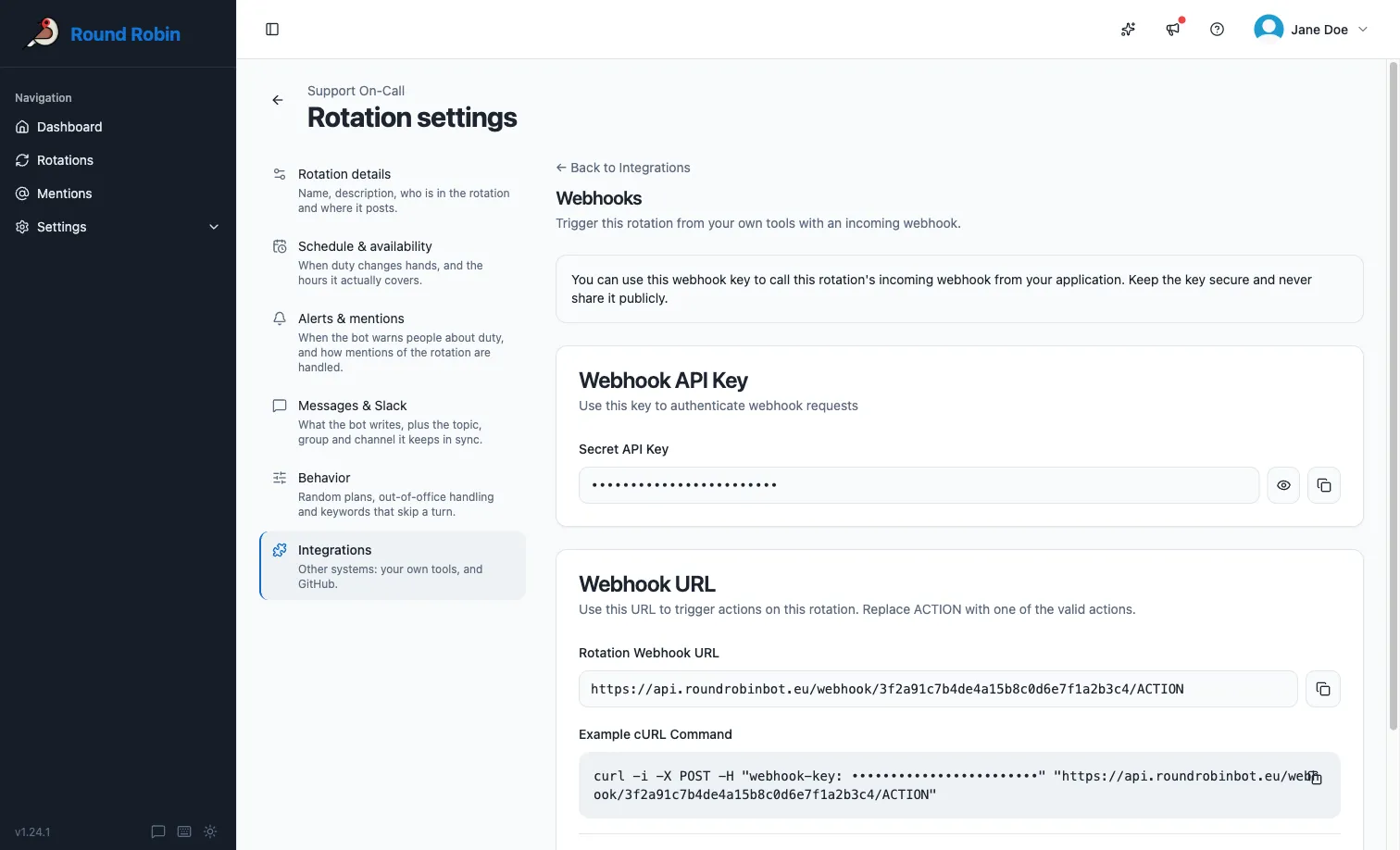
The same URL and key are shown on every visit. If the page shows only the deprecation notice, this rotation has no webhook: use an API key.
Call the webhook
Section titled “Call the webhook”Send an HTTP POST to the webhook URL, replacing ACTION with one of the actions below. Authenticate with the secret key in a webhook-key header. If the action takes parameters, pass them in the query string.
curl -i -X POST \ -H "webhook-key: YOUR_SECRET_KEY" \ "https://api.roundrobinbot.eu/webhook/YOUR_WEBHOOK_PATH/rotate"Actions
Section titled “Actions”| Action | URL segment | Query parameters | What it does | Public API replacement |
|---|---|---|---|---|
| Rotate | rotate |
None | Advances the rotation to the next user on duty. | POST /v1/rotations/{rotationId}/rotate |
| Set on duty | setonduty |
email (required): the Slack email address of the user to put on duty |
Sets an explicit user on duty. The user must be a member of the rotation. | PUT /v1/rotations/{rotationId}/on-call |
| Mention | mention |
userId (required): Slack user ID of the person asking for help; channelId (required): Slack channel ID where the mention is answered; message (optional): free-text context |
Opens a mention on the rotation, notifying whoever is on duty, exactly as if the bot had been mentioned in Slack. See What are mentions?. | None. Mention the bot in Slack, or connect an AI assistant. |
For example, to set a specific user on duty:
curl -i -X POST \ -H "webhook-key: YOUR_SECRET_KEY" \Errors
Section titled “Errors”| Situation | Result |
|---|---|
Missing webhook-key header |
401 Unauthorized |
| Wrong secret key | Request rejected as invalid access code |
| Unknown action in the URL | 404 Not Found |
| Rotation is disabled | Request rejected; enable the rotation first |
setonduty with a missing email, an email that matches no Slack user, or a user who is not a rotation member |
Request rejected with a validation error explaining the problem |
Next steps
Section titled “Next steps”- The public API: what replaces this, with the same actions and more.
- API keys: create the key your integration uses instead of a webhook key.
- Scopes and access: scope a key to the rotations and actions it needs.
- Connect an AI assistant: the conversational way to do the same things.