Topic management
Round Robin can keep a Slack channel’s topic showing who is on duty. Each time duty changes hands, it rewrites the topic in the channels you pick, so anyone opening the channel knows who to ping.
You need: rights to edit the rotation, and Round Robin invited to every channel whose topic it should set.
Invite Round Robin to the channel
Section titled “Invite Round Robin to the channel”Slack lets an app set a topic only in a channel it belongs to. This applies to public and private channels alike. In each channel, run:
/invite @Round RobinUntil then, Slack refuses the topic and the channel’s topic stays as it is.
Turn the topic on for the rotation
Section titled “Turn the topic on for the rotation”- Open your rotation in the web dashboard, click Settings, and open Messages & Slack.
- In the Channel topic card, turn on Update the channel topic, then save.
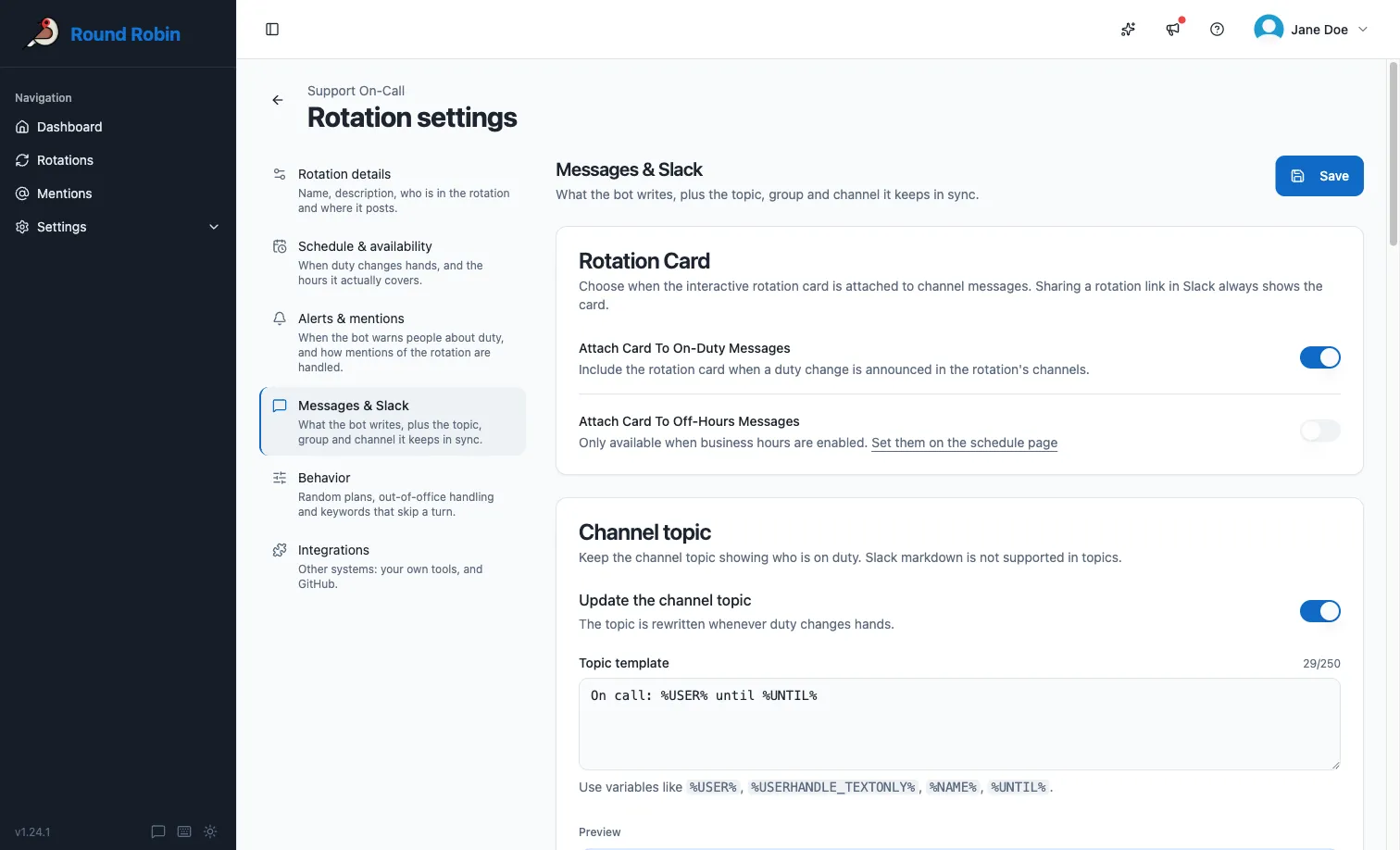
This switch covers the whole rotation, together with the wording. The card counts how many channels get the topic and links to the Channels tab, where you pick them.
Choose which channels get the topic
Section titled “Choose which channels get the topic”Open the rotation’s Channels tab. Each channel is a row, and the Channel topic column shows its state:
| Channel topic | Meaning |
|---|---|
| Kept in sync | Round Robin rewrites this channel’s topic at every change of duty. |
| Needs an invite | The topic is on for this channel, but Round Robin is not in it. Run /invite @Round Robin in the channel. |
| Not updated | The topic is off for this channel. |
To switch it for one channel:
- Click the channel’s row to open its settings.
- Turn Keep the channel topic in sync on or off. It applies straight away.
A channel can get the duty messages, the topic, or both. For a topic-only channel (one that shows who is on duty but is never posted in), add the channel, then turn Post duty messages here off.
Default topic
Section titled “Default topic”With the Topic template field empty, Round Robin writes:
Round Robin says: @user is on duty for rotation name.
It adds to that on its own:
- For automatic and external rotations, and wherever a coverage window closes at a stated hour, it adds when the current shift ends: “… on duty for rotation name until date.”
- If the rotation has an on-duty user group, it adds: “You can also ask for help using @duty-group.”
If more than one person is on duty, the wording adjusts (“are on duty” instead of “is on duty”).
When nobody is on call
Section titled “When nobody is on call”A rotation is uncovered whenever every one of its coverage windows is shut: at night, at the weekend, or whenever you arranged. During those stretches the topic says so:
Round Robin says: nobody is on call for rotation name. Cover resumes Mon 09:00 (Europe/Rome).
The time is on the clock of the coverage window that reopens first, and the topic names that clock. When nothing is scheduled to reopen, the topic stops at the first sentence.
Your custom topic template is not used while nobody is on call. It comes back as soon as somebody is on duty again.
Customize the topic template
Section titled “Customize the topic template”- Open the rotation’s Settings → Messages & Slack and find the Channel topic card.
- Type your template in the Topic template field, using replacement tokens such as
%USER%,%USERHANDLE%,%NAME%, and%UNTIL%. See templating for the full token list. - Check the Preview below the field, then save.
| Constraint | Detail |
|---|---|
| Length | 250 characters at most. |
| Formatting | Slack markdown is not supported in channel topics. |
| Empty template | Leave the field empty to fall back to the default topic. |
Clearing the topic
Section titled “Clearing the topic”When you turn Update the channel topic off, or delete a rotation that has it on, Round Robin clears the topics it set.
It clears only a topic it was the last to write. If somebody has edited the topic since, it stays as they left it.
Troubleshooting
Section titled “Troubleshooting”| What you see | What to do |
|---|---|
| Needs an invite in the Channel topic column, or Not in the channel in the Round Robin column | Run /invite @Round Robin in that channel. |
| No Channel topic column, and the note “The channel topic is switched off for this rotation.” | Follow Turn it on in Messages & Slack and turn on Update the channel topic. |
Next steps
Section titled “Next steps”- Templating: every token you can put in a topic.
- Customize rotation messages: the same treatment for the messages the bot posts.
- The rotation page: everything else the Channels tab does.
- Round Robin in Slack: topics are set up in the dashboard, not in Slack.